An AI Agent for an Accounting Office — How It Works Inside

An accounting office with around a hundred clients moves a few thousand documents a month. Ask anyone who works there what eats the day, and nobody says "deciding how to book things." They say retyping. Opening the attachment, reading the number, typing it into another window, checking whether the kontrahent is on the biała lista, finding out the client never sent the invoice for that 8 000 zł transfer from the eleventh.
The judgment is the part worth paying an accountant for. The typing is not. So the agent I build takes the typing and hands back the judgment, already sorted.
Here is what actually happens between "a document arrives" and "an accountant clicks approve" — nine steps, four diagrams, and one rule that shapes all of it.
One rule the whole thing is built around
The system never posts to the books.
It writes a document and a proposed dekret into the accounting system, and then it stops. A human decides whether that becomes a real entry. This is not a setting, not a phase-two plan, and not a slider someone can move once trust builds. It is enforced in code: the transition from awaiting approval to publishing is the only route into the accounting system, and it will not execute without a user id and a timestamp.
Everything downstream follows from that. If a machine cannot post, then a machine that is 95% right is genuinely useful rather than genuinely dangerous — because the remaining 5% lands in front of a person instead of in the books.
How documents get in
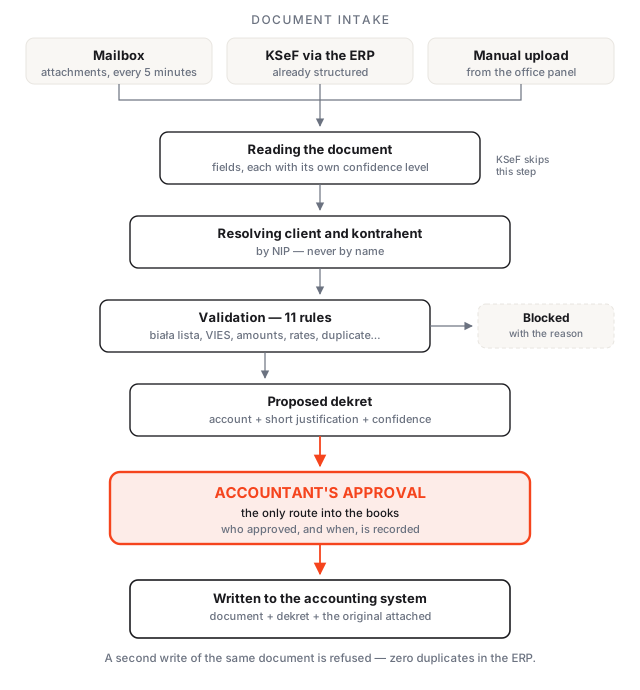
Three channels, one pipeline.
The mailbox. The agent reads the office inbox over IMAP every few minutes, pulls attachments, and ignores what is obviously noise — signature images, logos, tiny graphics. A PDF holding six invoices is split into six documents; when the page-range detection is not confident enough, the file goes to a manual split queue rather than being cut in the wrong place.
KSeF, through the accounting system. Where the ERP already pulls structured invoices from KSeF, the agent reads them from there. These skip the reading step entirely — they arrive as fields, not as an image of fields, and there is nothing to interpret.
Manual upload. Someone drops a file into the panel and picks the client.
Whatever the channel, the document is deduplicated on the combination of client, seller NIP, document number, gross amount and issue date — plus the KSeF number where one exists, which settles the question outright. The original file is stored untouched forever; corrections never rewrite it.
Then the client is resolved, in a fixed order: the buyer NIP from the document first, then the sender address against a per-client allow list, then a mailbox alias. No match means the document waits in a queue for a human to assign it in one click — never a guess about whose books it belongs in.
What the agent reads
From every document: seller and buyer identity including NIP and VAT-EU number, document and KSeF number, issue date, sale date, payment due date and method, currency, net, VAT and gross broken down per VAT rate, the bank account, and every line item with quantity, unit price, rate and amounts.
Two things about that list matter more than its length.
Each field carries its own confidence. Not a single score for the document — a score per field, because in practice the total is read correctly while a date is ambiguous, and treating those the same wastes the accountant's attention on the wrong place.
Bank statements never go near the model. MT940 and CAMT.053 are parsed deterministically, character by character. A statement is arithmetic, and arithmetic does not need a language model. Only PDF statements go through reading, and those get an extra check: opening balance plus movements must equal the closing balance, or the statement is flagged.
Foreign currency resolves through the NBP average rate from the last business day preceding the day the tax obligation arose. Weekends and holidays resolve backwards, never forwards. Deterministic, auditable, same answer every time.
What stops a document
Eleven rules run against every document. Eight of them can stop it dead.
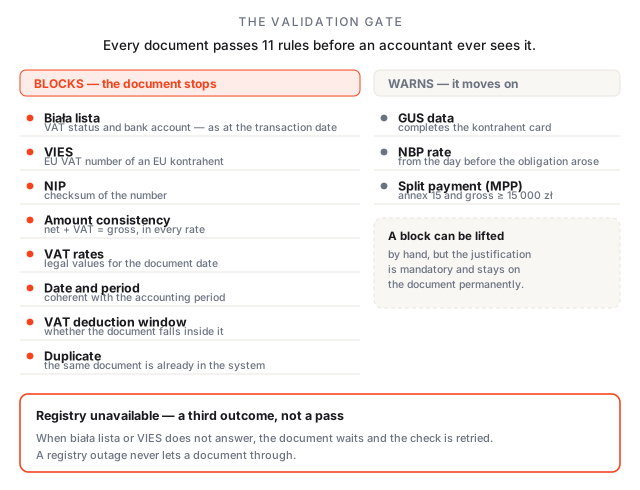
The detail worth pausing on is the third outcome. When the biała lista or VIES simply does not respond — and public registries do go down — the rule returns pending, not pass. The document waits and the check is retried. A registry outage never becomes a silent approval. That distinction sounds pedantic until the month it saves you from deducting VAT on an invoice from a company that was struck off two weeks earlier.
A block can be lifted by hand, but the justification is mandatory, it goes into the audit log, and it stays visible on the document permanently. Every rule result also stores the inputs it used, so a decision can still be explained during an audit three years from now.
Proposing the dekret
The plan kont is pulled from the accounting system per client, nightly and on demand. Against it, the agent proposes an account for each document, with a short justification and a confidence level. It takes into account NKUP, the passenger-vehicle limitations, and reverse charge on WNT and imported services.
The proposal is advisory and presented as a proposal — never as a decision already made. When the accountant changes it, the change is recorded along with the original suggestion, which means acceptance rate is measurable per client and per office rather than a matter of impression. That number is the honest basis for deciding whether the thing is working.
The approval screen
This screen gets used hundreds of times a day, so it is built for speed rather than for demos. The rendered document sits on one side and the extracted fields on the other; clicking a field highlights where it came from on the page. Corrections happen in place.
Work is split into queues — to approve, needs completion, blocked by validation, published, failed. Documents above a confidence threshold with no blocking failures can be approved in a batch. The approve-and-next loop is keyboard-first, because at this volume mouse round-trips are most of the cost.
Every document keeps its full history: each change, who made it, when, the approval, the publication, and the resulting reference in the accounting system.
The other half: what is missing
Booking what arrives is only half a month's work. The other half is the documents that never showed up.
The agent reads bank statements, works out which transactions ought to have a document behind them, and tracks the ones that do not.
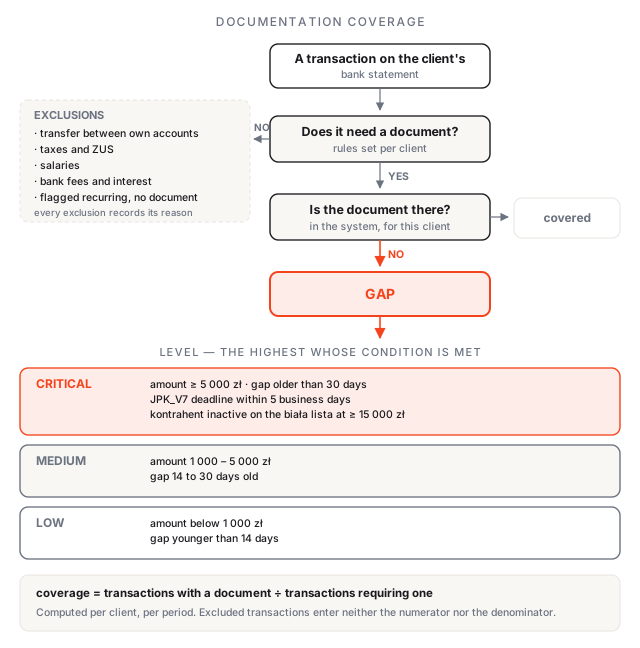
The exclusions matter as much as the gaps. Transfers between the client's own accounts, taxes and ZUS, salaries, bank fees — none of these need an invoice, and a system that flags them teaches everyone to ignore it. An accountant can also mark a transaction as recurring-without-document once, and the rule applies from then on. Every exclusion records why it was applied, because an unexplained exclusion is indistinguishable from a bug.
What remains is ranked, not just listed. A 40 zł gap from last Tuesday and a 12 000 zł gap from six weeks ago are not the same problem, and the ranking tightens automatically as the JPK_V7 deadline approaches.
The office view puts this together: which clients are ready to close the period, which have critical gaps, how many documents are waiting for approval. The gap list exports to XLSX, per client or for the whole office.
Chasing clients without ever sending on its own
The agent composes the reminder — date, amount, kontrahent, transfer title, everything the client needs to find the document on their side — and then waits. It never sends autonomously. Batches go out only after someone at the office approves them, cadence and templates are configurable per client, and a transaction already chased is not chased again inside the quiet period.
The same reasoning as the posting rule: drafting is work, sending is a relationship.
Where the data lives
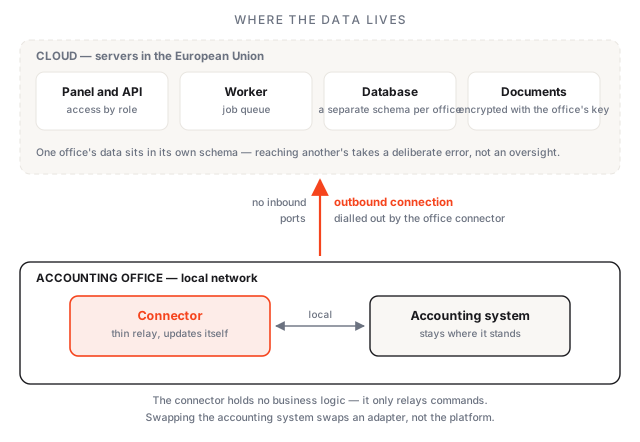
Each office gets its own database schema rather than a tenant column in shared tables. One forgotten WHERE clause in a shared-column design leaks one office's client documents to another, and in this business that is not a bug to patch — it is the end of the business. Schema isolation makes a cross-office read require a deliberate error rather than an omission.
Documents are encrypted with the office's own key before they leave the process, so the object store holds bytes it cannot read. Reading a document needs the right prefix and the right key.
The connector that sits on the office premises is deliberately thin: it relays commands and holds no business logic, no business state, and no decisions. It cannot even compile against the domain code — the build fails if anyone tries. That is what keeps it a connector instead of slowly becoming a second, undocumented version of the system.
What it does not do
- It does not post to the books. Covered above, but it belongs on this list too.
- It does not do rozrachunki. Matching a payment to a specific invoice inside the accounting system is out of scope.
- It does not guarantee a dekret accuracy figure. Accuracy is a quality goal that is measured and reported, not a number sold upfront. Anyone promising you a guaranteed rate has not run this in production.
- It does not replace an accountant. It replaces retyping. The judgment calls, the tax decisions and the client relationships stay exactly where they were.
Where to start
Not with all of it. Pick the one document flow that hurts most — usually purchase invoices arriving by email — and run it end to end for a month with real documents and real approvals. The acceptance rate is visible from week two, and it tells you honestly whether the next flow is worth connecting.
If you run an accounting office and this sounds like your month, write to me and we will look at your actual document volume together.
Check a Polish VAT counterparty in seconds, free
KsięgoAI checks a NIP against the VAT white list and VIES, scores the risk and saves proof of due diligence. Works in Telegram and Claude.
Try KsięgoAI→Let’s talk about your project
Free 30-minute consultation. We’ll figure out if and how I can help.